McKinsey Redrock: Complete Guide

Learn how the 35-minute Redrock Study works, master its four phases, and prepare with detailed strategy, maths guidance, and realistic practice.

Last updated: September 2026

McKinsey Solve walkthrough

On this page

McKinsey Redrock guide: overview and format

McKinsey Redrock is a 35-minute interactive case study in the McKinsey Solve assessment. It presents a scenario, typically involving ecosystem dynamics on a fictional island, where you gather information, perform calculations, and deliver recommendations.

You may also see it called Redrock Island, Redrock Study, or the Red Rock case study. These names describe the same module.

Duration
35 minutes in one sitting
Structure
Investigation, Analysis, Report, and Cases
Core skills
Evidence selection, quantitative reasoning, charting, and concise recommendations
Main challenge
Managing time while interpreting prompts and using an unfamiliar interface

Where McKinsey Redrock sits in Solve

Redrock is 35 minutes and is commonly completed in the same sitting as Sea Wolf, which lasts 30 minutes. A 65-minute invitation commonly refers to those two modules. An 85-minute invitation usually adds the established Sustainable Futures Lab format, while some 95-minute invitations appear to include a tested longer SFL format.

Your own invitation is the authority for the modules and timing you will receive. Read the McKinsey Solve Game overview for the complete assessment sequence.
How McKinsey Redrock works: the four phases

McKinsey Redrock follows four sequential phases in one 35-minute sitting. The Report phase creates the most important navigation constraint: once it starts, you cannot return to your Investigation or Analysis work.

  1. Phase 1

    Roughly 8–12 minutes

    Investigation

    You meet the case through a narrative scenario about ecological research on Red Rock Island, with exhibits such as tables, charts, and species data. The task is not to read everything; it is to decide which facts you will need later and park them in the research journal.

    • Draggable snippets from the case text and exhibits can be saved to the journal. Rename generic labels so values are easy to find under pressure.
    • Reorder and highlight entries to group related numbers: population counts, growth rates, territory sizes, and constraints.
    • Not every exhibit detail matters. Strong candidates extract numerical relationships, then move on rather than copying the full scenario.

    You can still open Investigation from Analysis if you need to verify an exhibit. That access ends when Report begins.

  2. Phase 2

    Roughly 10–15 minutes

    Analysis

    You answer a short set of quantitative questions, typically three, that depend on the evidence you captured. The on-screen calculator is part of the workflow; journal entries can be referenced while you work.

    • Questions may appear one per screen, with no going back once you advance, or together on one page where you can revise answers before continuing. Practise for the stricter single-page format.
    • Expect percentages, ratios, multi-step arithmetic, and occasional probability framed in the case context.
    • Misreading what a question asks for costs more points than a small arithmetic slip. Confirm units, time period, and which population the prompt refers to.

    Return to Investigation if an exhibit detail is missing from your journal, but finish that review before you enter Report.

  3. Phase 3

    Roughly 8–12 minutes

    Report

    You synthesise earlier work into two deliverables: a written summary and a visual report. This phase tests whether you can state conclusions clearly and match numbers to the right chart format.

    • Written report: fill-in-the-blank sentences or short fields that must align with your analysis. Watch whether the blank wants a number, a direction of change, or a category.
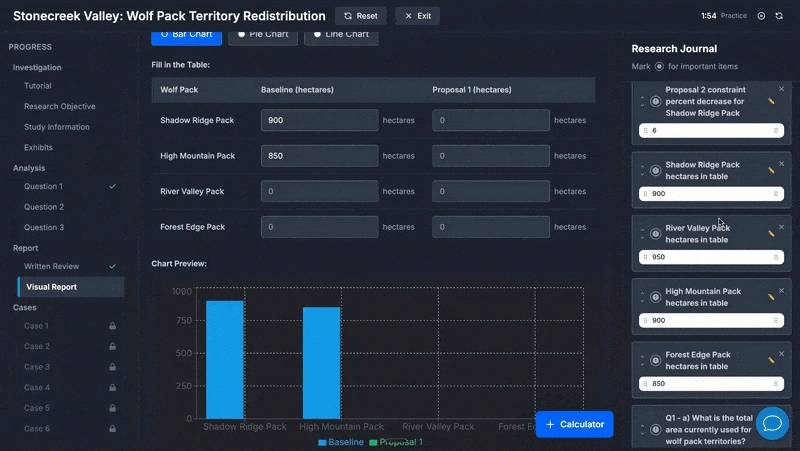
    • Visual report: choose or complete a chart type and enter the supporting values so the graphic matches your findings.
    • Investigation and Analysis screens lock once Report starts. Your journal and submitted Analysis answers stay available for reference.

    This is the main navigation constraint in Redrock. Capture anything you might need in the journal before you click forward from Analysis.

  4. Phase 4

    Roughly 10–15 minutes

    Cases

    Six standalone quantitative questions close the module. They do not reference the island scenario. Each item is its own mini-problem while the same 35-minute timer keeps running.

    • Topics commonly include percentages, probability, mean/median/mode from small datasets or histograms, and chart or table interpretation.
    • Questions are independent: a temporary assumption in one item does not carry to the next. Re-read each prompt on its own terms.
    • There is no penalty for guessing. Blank answers score zero, so budget a few seconds per remaining item even when time is tight.

    Cases reward fluency with fundamentals more than recall from the main case. Refresh core maths before test day so execution stays automatic.

McKinsey Redrock maths and study tips

Many candidates find the time pressure challenging, but the mathematical concepts themselves are accessible. Confidence with these fundamentals is essential because the calculations need to feel automatic while the timer is running.

Core arithmetic

Although a calculator is provided, mental arithmetic remains important for quick verification. Being able to spot an answer that is an order of magnitude off prevents costly mistakes.

  • Round-number operations should feel automatic.
  • Decimal shifts when dividing by 10, 100, or 1,000 should be instant.
  • Watch for transcription errors, such as reading 1,500 as 15,000.

Working with percentages

Percentage calculations appear frequently. Make sure you can apply changes, recover original values, and recognise when successive percentages must be multiplied.

  • A 15% increase means multiplying by 1.15; a 15% decrease means multiplying by 0.85.
  • If a value is now 110% of its original, divide by 1.1 to recover the starting figure.
  • Two consecutive 10% increases multiply: 1.1 × 1.1 = 1.21, or 21% total growth.
  • A 10% gain followed by a 10% loss does not return to the original value; it leaves 99%.

Probability fundamentals

  • Move fluidly between fractions, decimals, and percentages: 1 in 8 = 0.125 = 12.5%.
  • Always confirm the total population before calculating a probability.
  • Match your answer format to what the question requests.

Statistical measures

Be comfortable calculating and interpreting mean, median, and mode, including from histograms. A common error is identifying the median as the middle value on the x-axis rather than the middle value in the ordered dataset.

Estimation for verification

Quick mental estimates help catch calculator errors. For instance, 23% of 250 should be close to 25% of 250, which is 62.5. If the calculator shows 575, something went wrong.

McKinsey Redrock strategies and best practices

Time pressure is more challenging than the underlying mathematics. The strongest approach keeps your evidence organised, your calculations easy to verify, and your pace steady enough to reach every phase without rushing the final questions.

Engage with the provided tools

The on-screen calculator and interactive journal are part of the assessment workflow. Use the calculator for non-trivial arithmetic. Organise the journal thoughtfully, rename generic labels, group related information, and highlight critical values.

Answer every question

There is no penalty for incorrect answers, so leaving a question blank only guarantees zero points. When time is short or uncertainty is high, make a reasoned choice and move forward.

Pause before submitting

Build a brief review window, even 10 seconds, before confirming each answer. Check the unit, sign, decimal place, and requested answer format before you commit.

Expect ambiguity

Question wording can be unclear. Spending excessive time trying to decode the perfect interpretation is counterproductive. Make a reasonable interpretation, commit to it, and proceed.

Watch for assumption resets

Questions that appear sequential may actually be independent. A follow-up can introduce a temporary assumption or return to the original baseline, so read each question on its own terms.

See an assumption-reset example

Baseline: the elk population is always three times the bear population, elk grow 8% annually, and Year 1 elk equal 120.

  • A question asks for the Year 1 bear population. The answer is 40.
  • The next question temporarily changes elk growth to 15%.
  • A later question asks for the projected bear population using the original scenario, so the growth rate returns to 8%.

The trap is carrying the temporary 15% assumption into a question that has returned to the baseline.

How to prepare for McKinsey Redrock

A few focused practice sessions are more valuable than hours of passive research. Use this sequence to make the calculations, interface, and test flow feel familiar before test day.

  1. Refresh quantitative fundamentals

    If percentage calculations, probability concepts, or statistical measures feel unfamiliar, invest time in targeted practice. The goal is not advanced mathematical mastery; it is fluency with the basics so execution becomes automatic.

  2. Understand the test flow

    Learn when you can return to earlier work and when the Report phase locks it. After a walkthrough, the structure becomes familiar and less intimidating; extensive passive video research offers diminishing returns beyond basic orientation.

  3. Complete realistic practice cases

    Work through simulations that replicate the interface, timing, and question complexity. A good practice case should feel challenging and somewhat ambiguous because that is the experience you need to rehearse.

For a closer look at the tools themselves, read the Redrock calculator and interface guide.

Practise McKinsey Redrock with the full simulator

The Redrock case library covers the complete four-phase workflow under timed conditions. Practise with interactive exhibits, the journal system, and the same transition into written and visual reporting that you need to manage in the assessment.

Redrock simulator showing the case-study interface
Redrock case practice in the Solve Games Guide simulator
  • 15+ unique case scenarios
  • Investigation, Analysis, Report, and Cases included
  • Interactive data exhibits, calculator, and research journal
  • One free case, followed by unlimited attempts on eligible plans
Explore the Redrock simulator

McKinsey Redrock FAQ

Clear answers about the format, preparation, and names you may see before test day.

What is the Redrock game in the McKinsey Solve assessment?

The Redrock game (also called Red Rock Study or Redrock Island) is a data-focused case study within McKinsey's digital assessment. Candidates analyse information about a fictional ecosystem and work through research, analysis, and reporting phases to demonstrate structured thinking and quantitative skills.

Is Redrock Island the same as the Redrock Study?

Yes. Redrock Island describes the setting, while Redrock Study describes the task. Both names refer to the same four-phase case inside McKinsey Solve.

How long is the McKinsey Redrock game?

Redrock lasts 35 minutes and must be completed in one sitting. Your invitation will show which other Solve modules are included in your assessment.

How hard is McKinsey Redrock?

The challenge comes primarily from time pressure rather than mathematical complexity. Candidates who have practised with realistic simulations and are comfortable with percentage calculations, probability, and data interpretation generally find it manageable.

What is the best way to prepare for Redrock?

Complete practice cases that simulate the real format, including the interface, timing, and question style. Supplement this with targeted review of any mathematical concepts that feel rusty. A few quality practice sessions are more valuable than passive study.

Does McKinsey provide official Redrock practice materials?

McKinsey offers limited preview information but not a full practice version of the Redrock assessment. Third-party simulators based on candidate research provide the closest approximation to the real experience.

Can I practise McKinsey Redrock for free?

Yes. Solve Games Guide includes one free Redrock case with the same Investigation, Analysis, Report, and Cases flow. No credit card is required.

Can I succeed without using a simulator?

Strong quantitative skills improve baseline performance, but the Redrock interface is unfamiliar to most candidates. Practising with a simulator removes the cognitive overhead of learning the format during the actual assessment.

How does Redrock performance affect my application?

The Solve assessment, including Redrock, is an early screening stage. Performance influences whether candidates advance to interviews. McKinsey does not typically share specific scores.

Can I retake the assessment?

Policies vary, but candidates typically cannot retake Solve for the same role within approximately 12 months. It is best to prepare thoroughly for the first attempt and confirm the current policy with your recruiter.

Choose Your Package

Select the package that fits your preparation needs. All packages include 2-week access.

You only get one attempt at the McKinsey Solve Games. This costs less than a single interview coaching session, and prepares you for the actual filter.

Most candidates choose this

Ultimate

The complete toolkit: simulations, solver, cases, and both unique versions of the Sustainable Futures Lab game. Everything you need to prepare with confidence.

  • Sea Wolf Solver
  • Sea Wolf Simulations
  • All 5 known McKinsey Solve formats
  • 20+ full-length Redrock case studies
  • 5 Standard Sustainable Futures Lab Missions
  • 5 Lab Leader Sustainable Futures Lab Missions
  • 50% refund if none of our 5 Redrock formats appear
  • 100% refund performance guarantee
  • Higher Assessment Success Rates

The 3 hour prep

Three-hour prep for candidates who want one Redrock case per template, two Sustainable Futures Lab missions, and the Sea Wolf solver.

  • Sea Wolf Solver
  • All 5 known McKinsey Solve formats (one of each)
  • 5 Redrock case studies
  • 2 Standard Sustainable Futures Lab Missions
  • 2 Lab Leader Sustainable Futures Lab Missions
  • Best last-minute prep

Redrock Cases

Structured practice on 20+ full-length consultancy-style case studies modeled on the 5 known McKinsey Solve assessment formats.

  • All 5 known McKinsey Solve formats
  • 20+ full-length Redrock case studies
  • Best budget choice

Sea Wolf + Sustainable Futures Lab

Master Sea Wolf scoring and simulation, plus both unique versions of the Sustainable Futures Lab game.

  • Sea Wolf Solver
  • Sea Wolf Simulations
  • 5 Standard Sustainable Futures Lab Missions
  • 5 Lab Leader Sustainable Futures Lab Missions

Solver Only

Best for beginners who want to learn scoring logic quickly.

  • Sea Wolf Solver

Put your McKinsey Redrock strategy into practice

Start with one free four-phase case using the journal, calculator, and Report workflow.

Start a free McKinsey Redrock case