Should you use McKinsey's Redrock Onscreen Calculator? McKinsey Solve Interface Tips for Success
When preparing for the McKinsey Redrock game, most candidates focus on improving their mathematical skills and analytical abilities. While these are certainly important, there’s a critical aspect that many overlook: how you interact with the game’s interface itself.
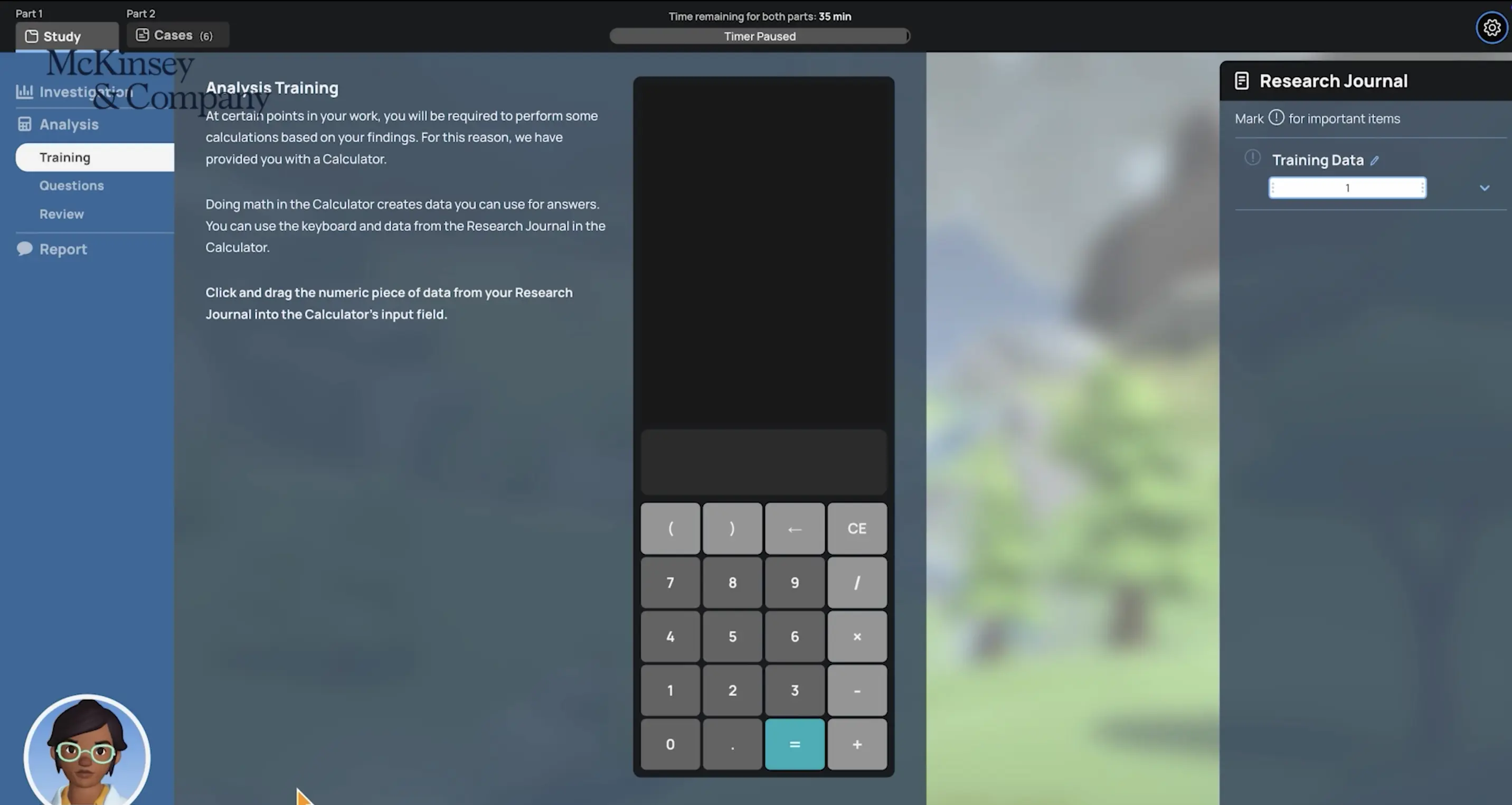
The Redrock assessment includes an interactive dashboard with two key tools - an onscreen calculator and a digital journal. McKinsey has deliberately included these features and prominently showcases them in the tutorial. This isn’t accidental. Understanding why these tools exist and how to use them properly can significantly impact your performance and potentially your process score.
Why the Calculator and Journal Matter
The Redrock game doesn’t just evaluate whether you arrive at correct answers - it also assesses how you reach those answers. McKinsey has tracking built into the Solve Game platform. When you use the onscreen calculator and digital journal, the system can observe your calculations, how you organize information, and your problem-solving methodology. This feeds into your “process score” - an evaluation of your approach, not just your final answers.
Both tools are prominently featured in the tutorial for a reason. Use them as intended; don’t rely on external tools or skip the journal.
The Critical Question: Should I use my own Calculator?
Should you use your own calculator? No. Always use the onscreen calculator provided in the game.
Using an external calculator or solving elsewhere gives the system no visibility into your process - which can hurt your process score or raise integrity concerns. McKinsey built a calculator into the interface because they want to see your work. Don’t risk penalties or missed credit; show your calculations through the interface they provide.
Journal: What It Does and How to Use It
The digital journal is your workspace during the investigation and analysis phases. You can save draggable information from the case study, rename entries with clear labels (e.g. “Alpha Wolf Pack size” instead of “Data 1”), reorder entries by dragging, and highlight key values.
Use all the features of the journal as the tutorial goes through the trouble of teaching you how to use them. Organize entries in a logical way; highlight information numbers or values likely to be tested; rename generic labels to more specific names. Using the journal well will also benefit you in the assessment by reducing cognitive load. More importantly, it shows McKinsey that you think structurally and prioritize information.
What McKinsey Is Really Testing
These interface tools aren’t just about the mechanics of playing the game. They’re assessment devices that reveal how you:
Think Structurally
Candidates who organize journal entries logically demonstrate structured thinking - a core consulting skill.
Prioritize Information
Choosing what to save and what to leave out shows your ability to identify what matters in complex situations.
Work Transparently
Using the provided tools makes your thinking visible, demonstrating confidence in your approach.
Follow Instructions
Using the tools as introduced in the tutorial shows you can follow guidance and work within established systems.
Manage Complexity
Effectively leveraging these tools to handle a complex case demonstrates your ability to navigate sophisticated problems.
Final Thoughts
The McKinsey Redrock interface tools - the onscreen calculator and digital journal - aren’t optional accessories. They’re integral parts of the assessment that likely contribute to your process score and definitely provide McKinsey with insights into how you think and work.
Key Takeaways:
- Always use the onscreen calculator - Never rely on external tools or pure mental math
- Actively engage with the journal - Save, rename, reorder, and highlight strategically
- Practice with the interface - Don’t just practice problems; practice using the tools
- Follow the tutorial guidance - McKinsey is telling you what matters; pay attention
- Think about process, not just answers - Your methodology is being evaluated
Remember: McKinsey has invested significant resources in building these interface features. They’re prominently featured in the tutorial. They’re trackable by McKinsey’s systems. All of this points to one conclusion: these tools matter.
Candidates who master both the content (mathematical skills, analytical reasoning) and the process (effective tool usage, systematic organization) position themselves for the highest possible scores.
Ready to Master the Redrock Interface?
Start practicing with realistic tools today:
- Try Our Redrock Simulator - Exact replica of the real interface
- Complete Redrock Strategy Guide - Comprehensive preparation tactics
- Understanding the Redrock Game - Complete overview of game structure
Don’t leave your process score to chance. Build familiarity with the interface tools and demonstrate the structured, transparent thinking that McKinsey values.
Questions about Redrock interface strategies? Contact us for personalized coaching, or explore our pricing plans for access to premium simulators and detailed analytics.
Ready to Practice?
Get unlimited access to our McKinsey Solve Game simulators and master every scenario with realistic practice.