How to Do the McKinsey Sustainable Futures Lab: A Step-by-Step Guide

This guide answers three questions about the McKinsey Sustainable Futures Lab (SFL): what it is, what happens during it, and how to do it. It covers the 30-minute version, where you lead a team of four researchers over three days. Every step has a screenshot, so you know what each screen looks like before you see it on test day.
About the screenshots. McKinsey does not publish images of the real game. The screenshots here come from Lab Leader, our simulator of this format, which we built from what candidates have described. The stages and layout follow those reports. The scenario, the names and the exact wording on your test will be different.
What is the SFL?
The SFL is one of the games in McKinsey Solve, alongside Redrock and Sea Wolf. There are currently two versions, and your invitation email tells you which one you have:
- 85-minute invitation: the 20-minute SFL, a set of 13 scenario questions. Our Sustainable Futures Lab overview covers that version.
- 95-minute invitation: the 30-minute SFL, a team management game. This guide covers that version.
In the 30-minute SFL you run a research lab that is trying to fix an environmental problem on an island. You have four researchers and four workstations. Over three days you decide who to talk to, where each researcher works, how to answer their problems and how each of them is feeling.
There are no calculations and no data tables. The game looks at how you use limited information to manage a team. McKinsey does not publish how it is scored.
What happens during the SFL?
The game has a short setup, then three days. Every day has the same four stages in the same order.
| When | What you do |
|---|---|
| Setup | Read the tutorial and the project introduction, then put four onboarding questions in order |
| Explore | Spend a small number of questions on researchers or workstations |
| Assign | Move researchers between workstations and give a reason for each move |
| Support | Answer each researcher’s request for help |
| Reflect | Rate how each researcher is feeling |
Each day also has a goal, shown in the top left of the screen. In Lab Leader the goals and question budgets are:
| Day | Goal | Explore questions |
|---|---|---|
| Day 1 | Solve for Researcher needs | 3 |
| Day 2 | Solve for Workstation needs | 3 |
| Day 3 | Balance Researcher and Workstation needs | 2 |
On test day, read the goal panel at the start of each day rather than relying on this table. The goal tells you what that day’s questions should be spent on.
With 30 minutes for three days, aim for roughly ten minutes a day.
How to do the SFL, step by step
Step 1: Read the project introduction
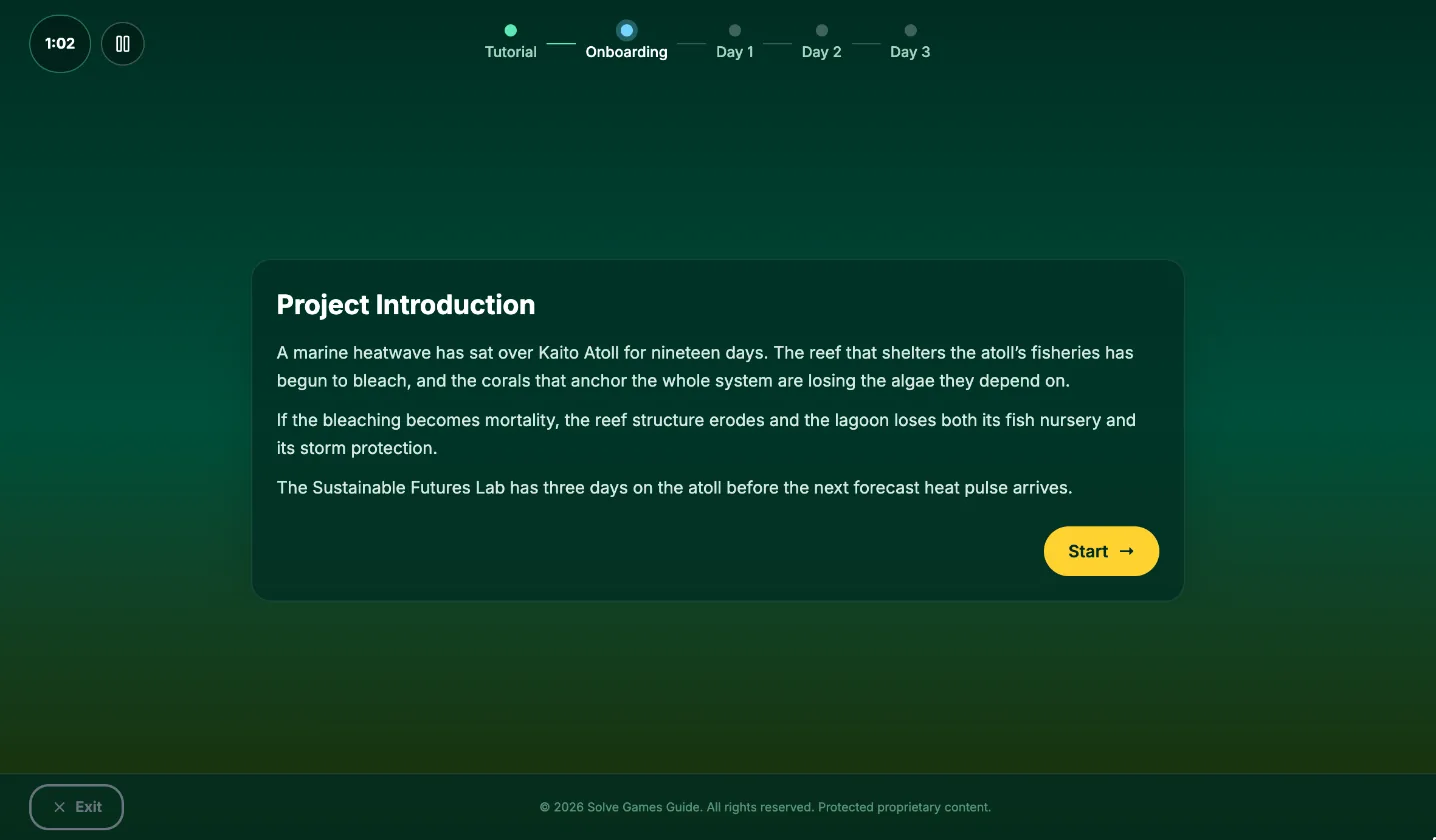
After the tutorial, you get a short project introduction. In this example, a marine heatwave is bleaching the coral reef that shelters an atoll and its fisheries.
What to do: Read it once and sum up the problem in one line for yourself. Every later decision connects back to it.
Step 2: Put the onboarding questions in order
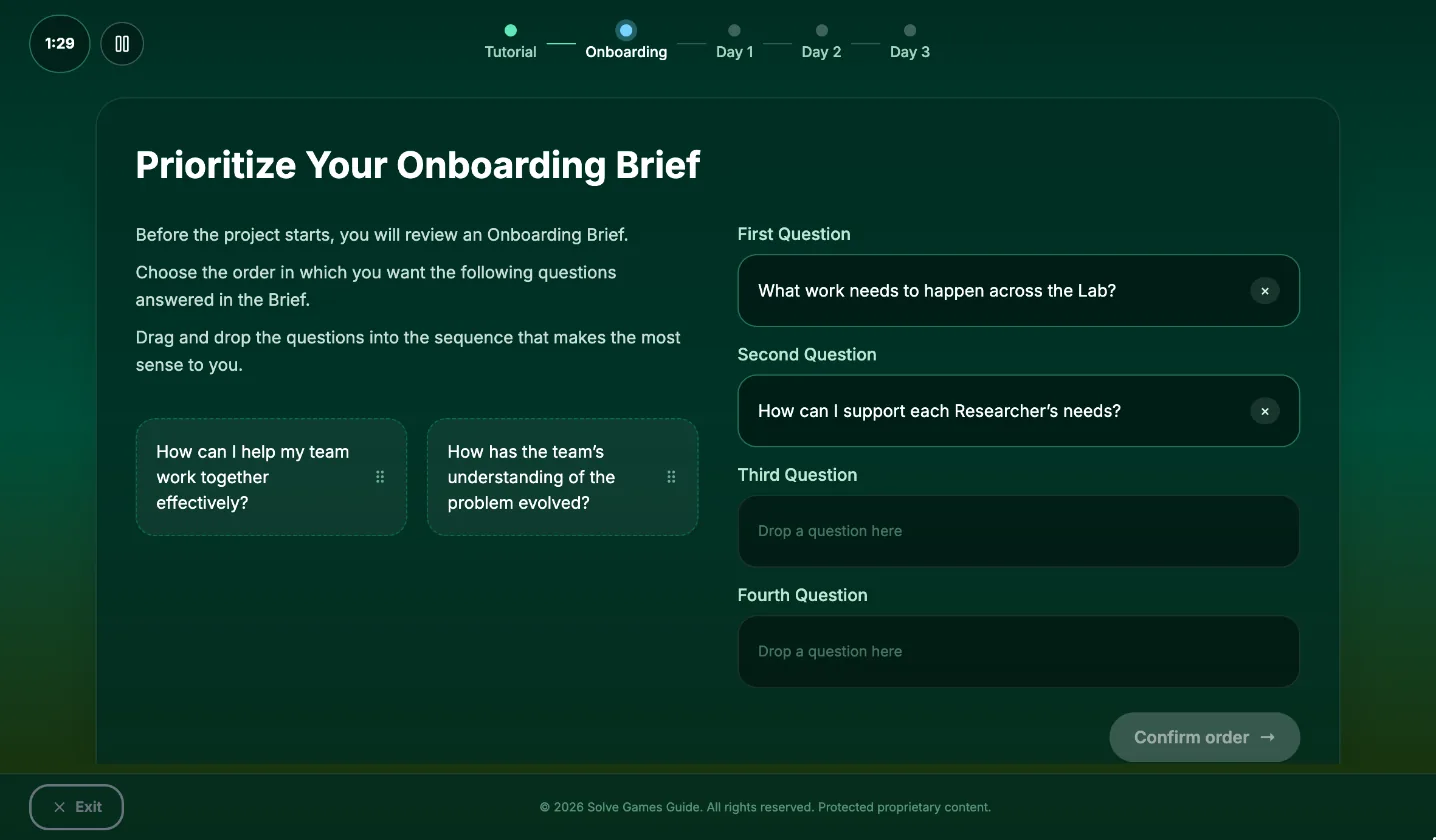
You are given four questions and asked to drag them into the order you want them answered:
- What work needs to happen across the Lab?
- How can I support each Researcher’s needs?
- How has the team’s understanding of the problem evolved?
- How can I help my team work together effectively?
What to do: Choose an order you can explain in one sentence, then confirm it. We do not know of a single correct order, so do not spend more than a minute here.
Then read the brief carefully. It introduces each researcher and what they are good at. That is your best guide for where to place people on Day 1.
Step 3: Explore
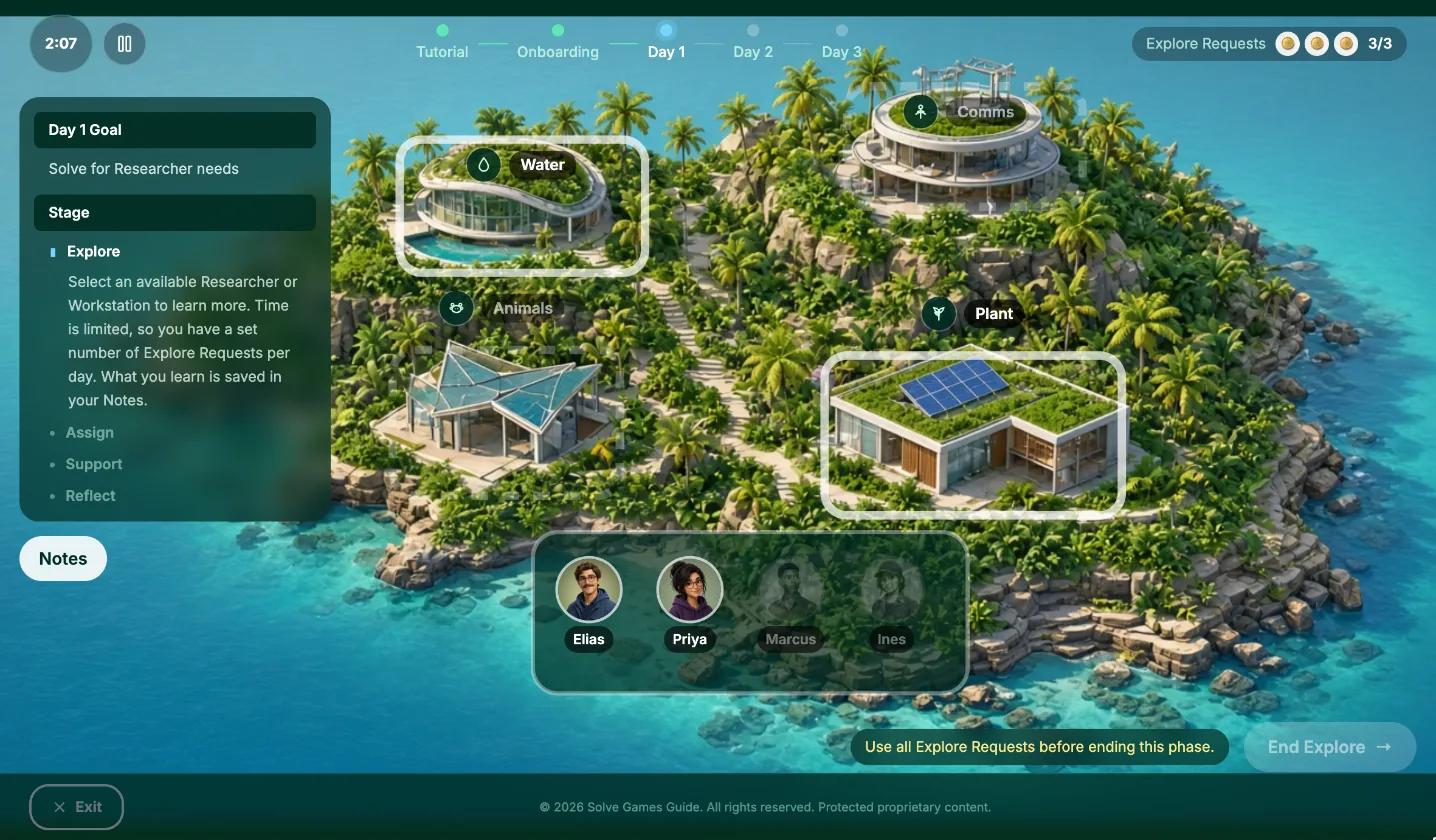
Explore is where you gather information. You have a few Explore Requests, shown as coins in the top right. Click a researcher’s portrait or a workstation to spend one.
What to do:
- Read the day’s goal.
- Spend your requests on what the goal points to. On a researcher day, ask the researchers you can reach. On a workstation day, ask the workstations. On a balance day, ask one of each.
- If you have a request left after that, spend it on the other kind.
- Read each answer for two things: where this person or station needs help, and how the person is feeling. You will use the first in Assign and the second in Reflect.
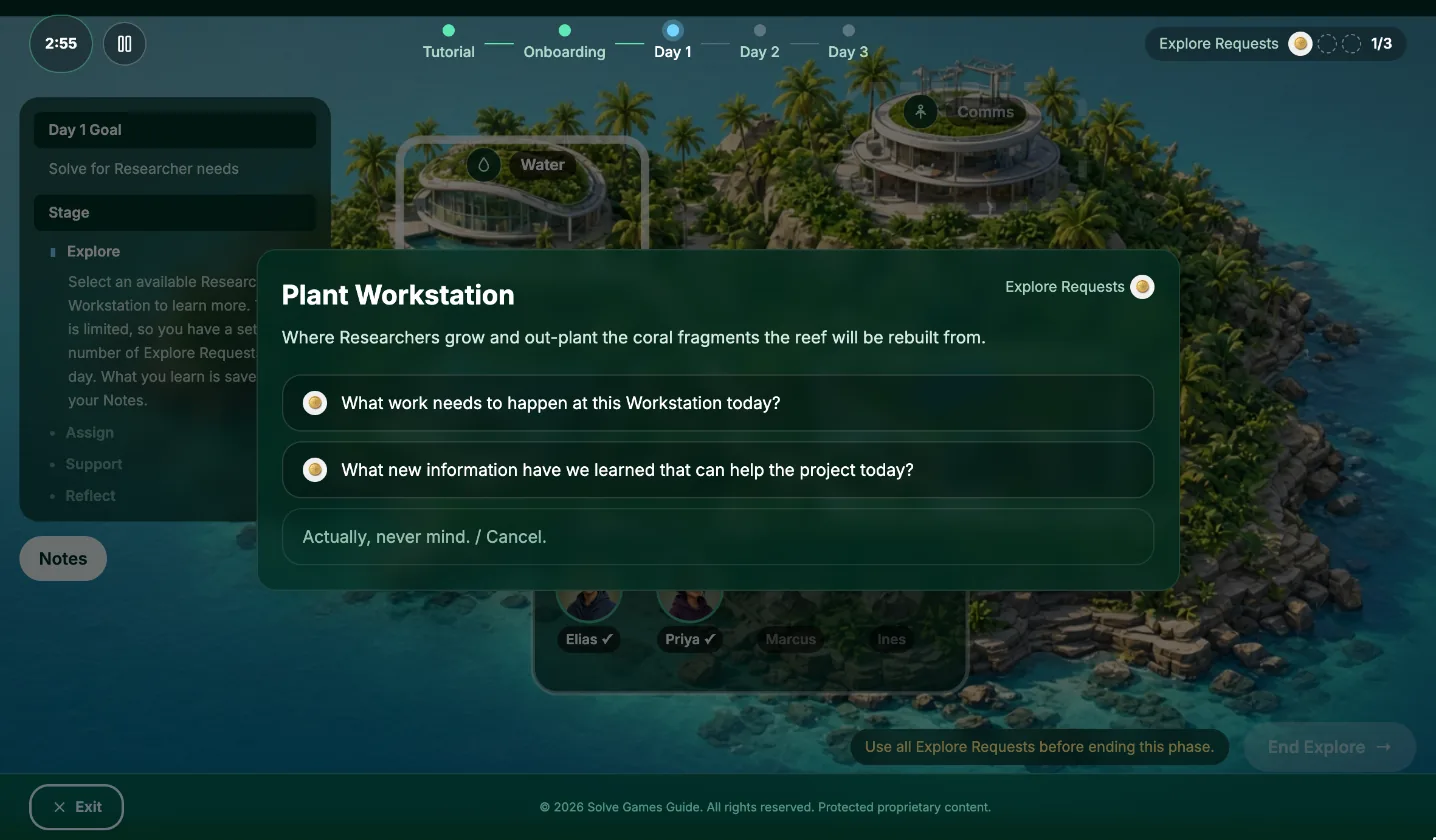
How it works:
- Each researcher and each workstation offers two questions. You pick one.
- Researchers can be asked “How are you feeling about working on the project today?” or “How would you like to work with others on the project today?”
- Workstations can be asked “What work needs to happen at this Workstation today?” or “What new information have we learned that can help the project today?”
- You can only ask each researcher or workstation once per day.
- Some are greyed out and cannot be asked that day. This is normal. You will not be able to ask everyone.
- You must use every request before you can end Explore.
- Every answer is saved in Notes, which you can open at any point.
Who you ask is the bigger decision. Both questions give you something useful, so do not agonise over which of the two to pick.
Step 4: Assign
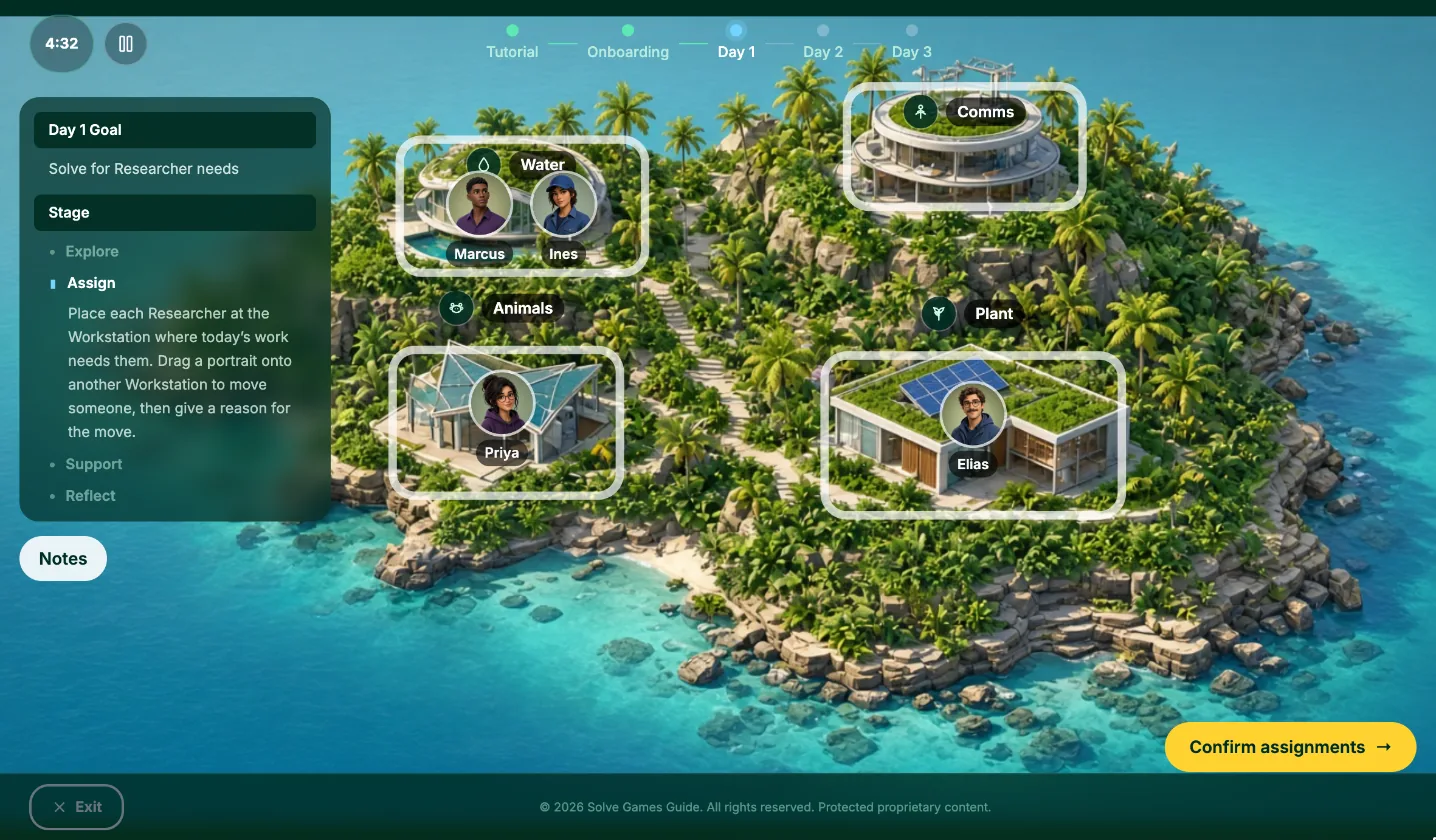
Assign is where you decide who works where today. Drag a researcher’s portrait onto a workstation to move them.
- Two researchers can share a workstation, and a workstation can be left empty.
- In Lab Leader, on Days 2 and 3 everyone starts the day at a different workstation from where they finished the day before, so you have to decide again where each person goes.
Common mistake: Moving a researcher you have learned nothing about. With no information, the move is a guess.
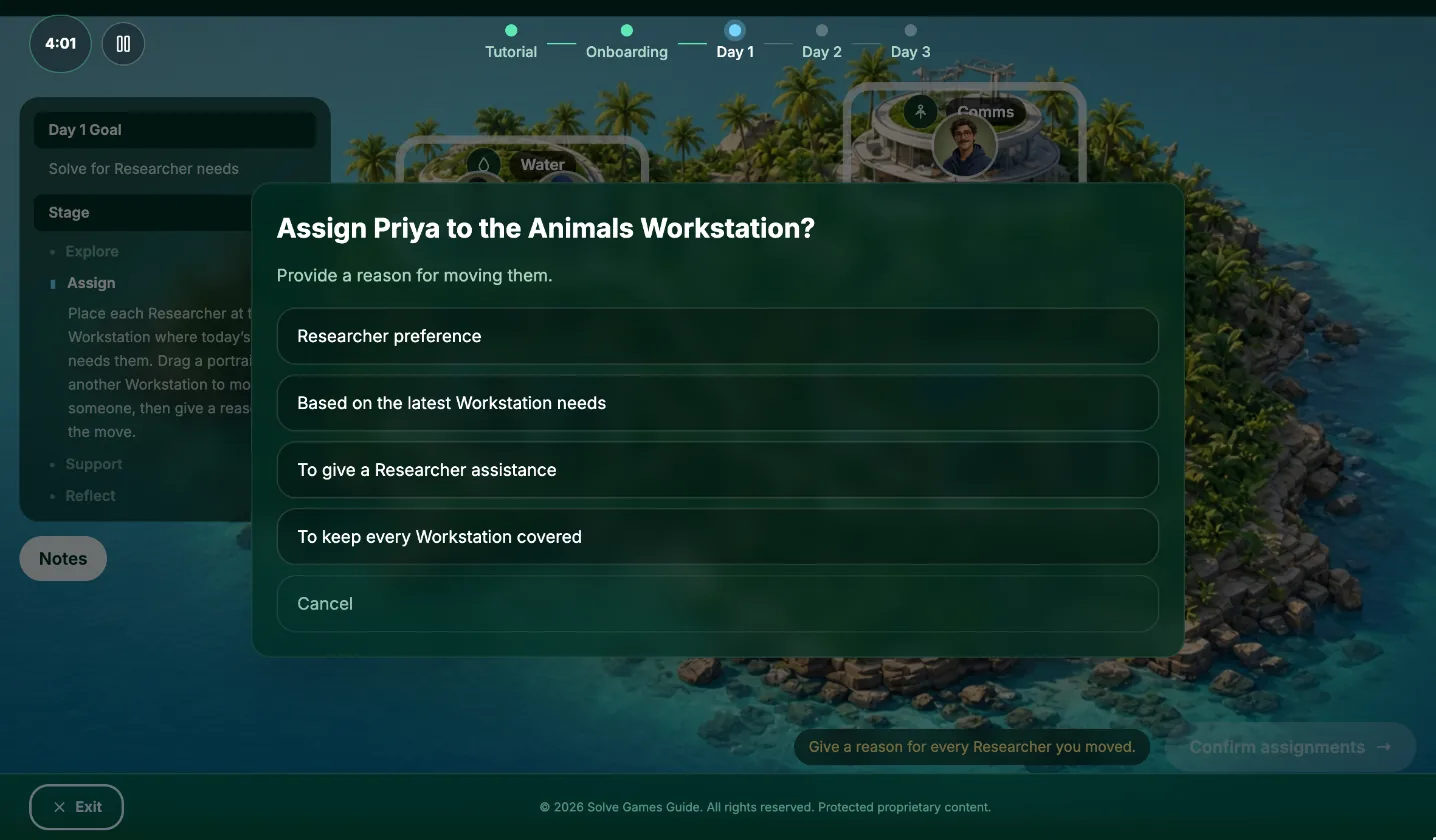
Each time you move someone, you choose a reason: Researcher preference, Based on the latest Workstation needs, To give a Researcher assistance or To keep every Workstation covered.
What to do:
- Day 1: Put people where they told you they work best, in Explore or in the onboarding brief.
- Days 2 and 3: Start from where everyone was yesterday. Then change only what today’s information tells you to change, such as a station with too much work for one person, or a researcher who asked to move.
- Pick the reason that matches why you made the move. If you cannot name a reason, ask yourself whether the move is needed.
Step 5: Support
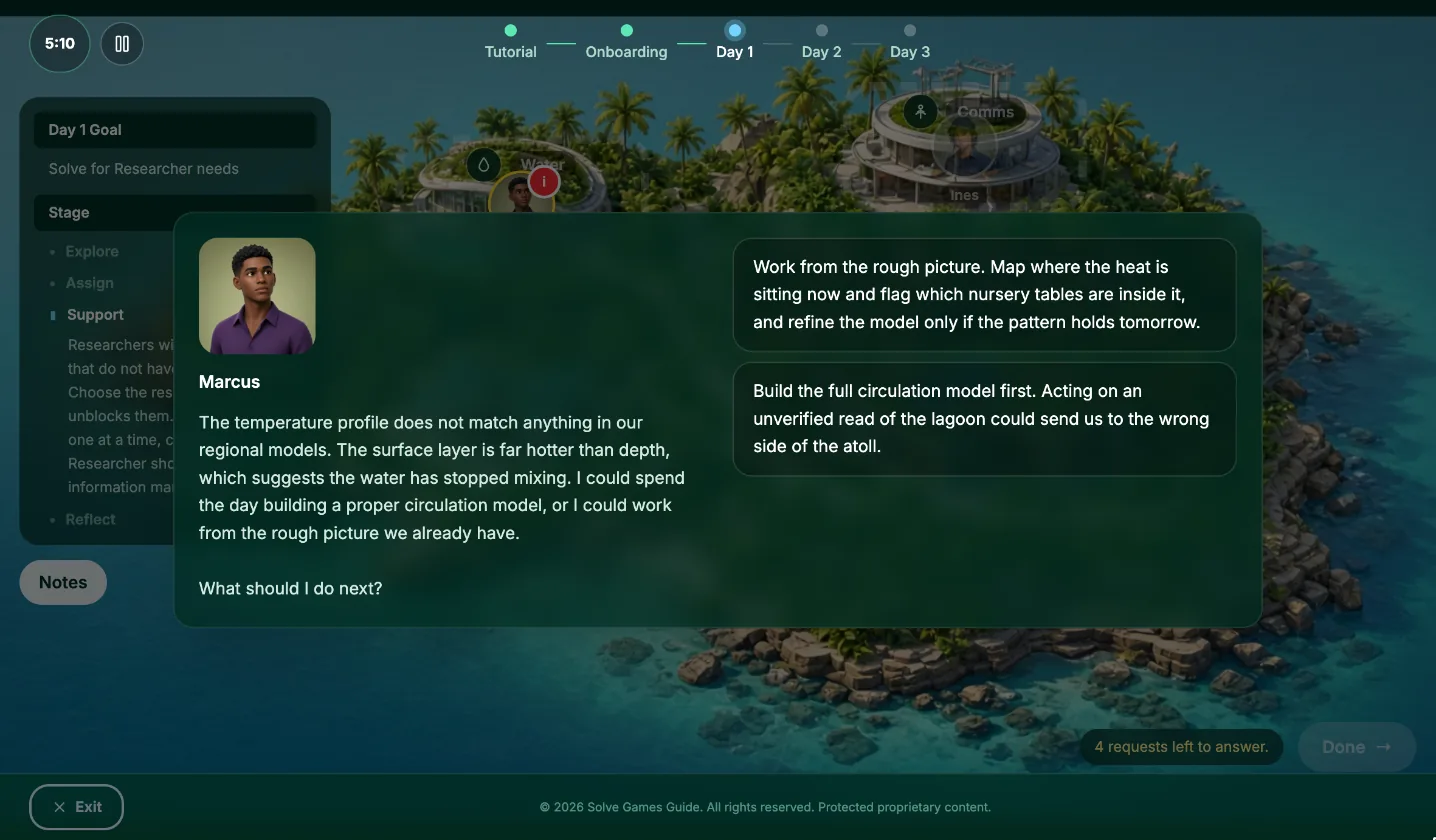
Once the team is working, researchers come to you with problems. A researcher with a request has a red marker on their portrait. Click it to open the request, read it and choose a response. You have to answer every request before the day can move on.
What to do:
- Answer the problem the researcher actually raised, not a nearby one.
- You will rarely have complete information. Prefer responses that move the work forward with what is known and leave room to adjust when new facts arrive.
- Be wary of responses that delay, push the problem onto someone else or skip over the person’s concern.
- Notice what the researcher says about themselves. Someone who says a task is outside their comfort zone is telling you how they feel, and that matters in the next step.
Step 6: Reflect
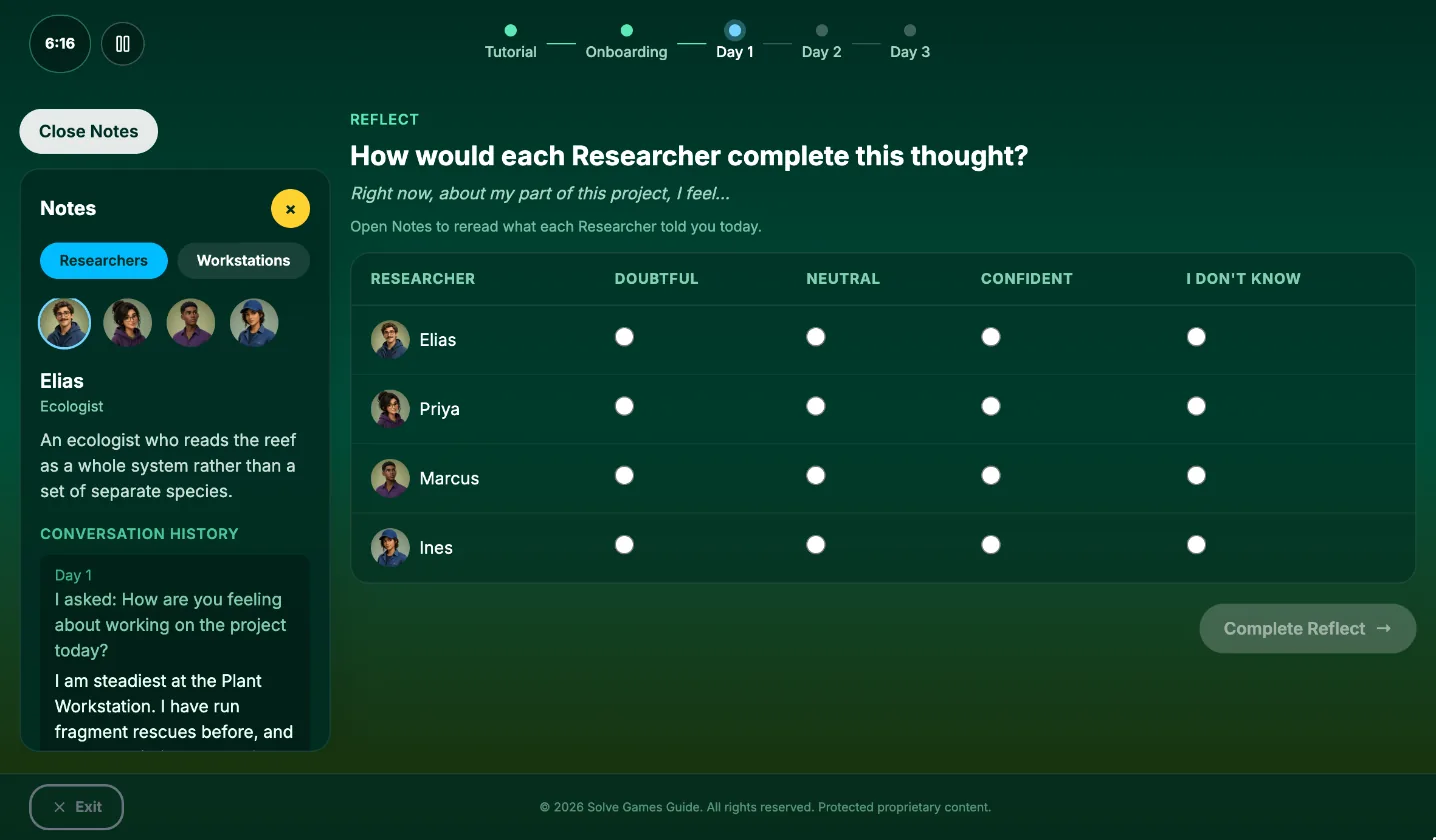
At the end of each day you rate each researcher by finishing a sentence for them, such as “Right now, about my part of this project, I feel…” You pick one of three ratings or “I don’t know” for each of the four.
What to do:
- Open Notes and reread what each researcher said today. Rate them from their own words.
- From Day 2 onward, use what happened in Support as well. If you resolved someone’s problem, they are probably in a better place than yesterday. If you did not, they probably are not.
- If you have heard nothing from a researcher, choose “I don’t know”. Lab Leader treats an honest “I don’t know” better than a wrong guess.
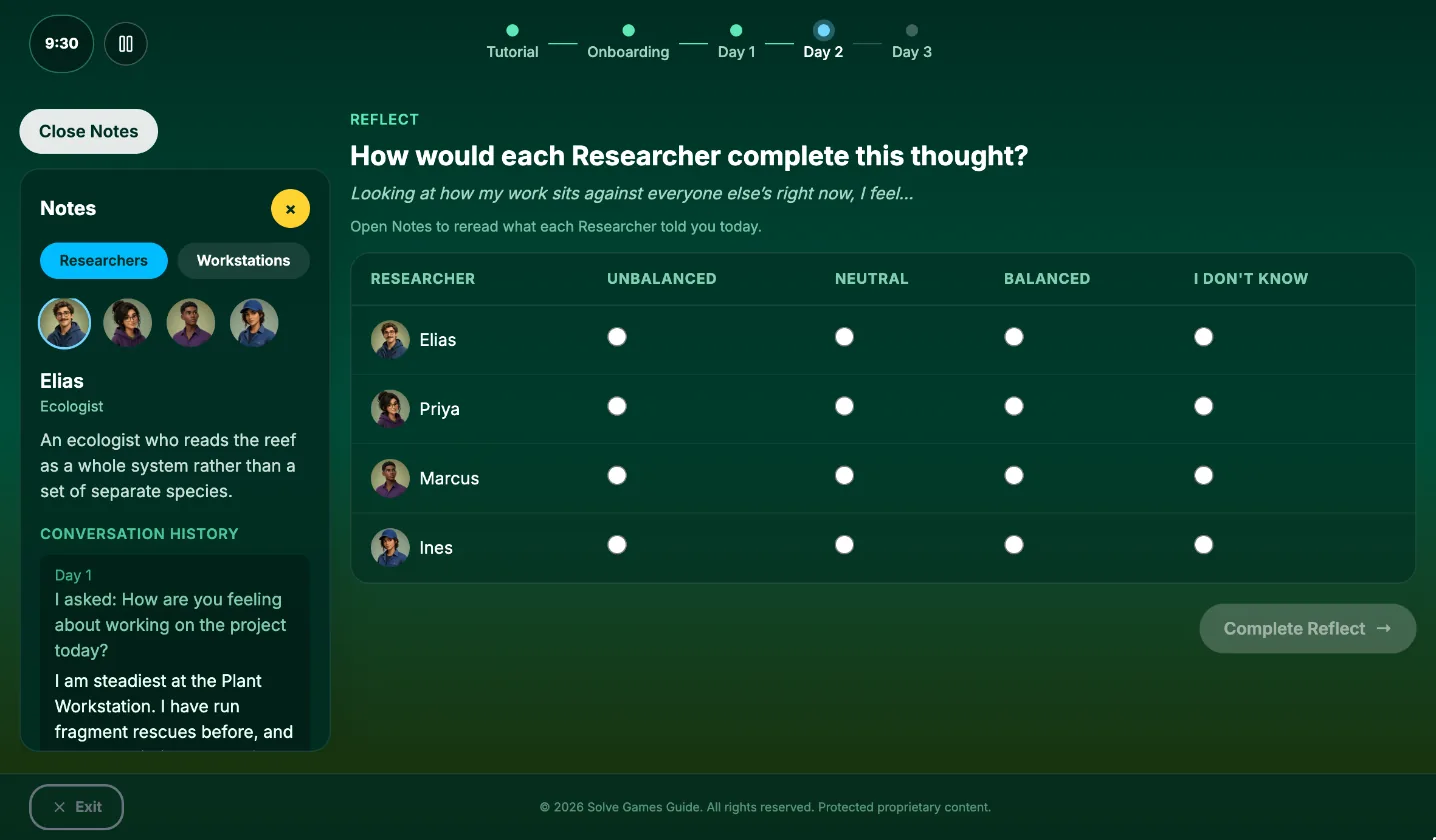
The scale changes from day to day. On Day 1 it might be Doubtful, Neutral or Confident. On Day 2 it might be Unbalanced, Neutral or Balanced.
Common mistake: Rating someone from what another researcher said about them. Go by what the person said themselves.
Step 7: Repeat for Day 2 and Day 3
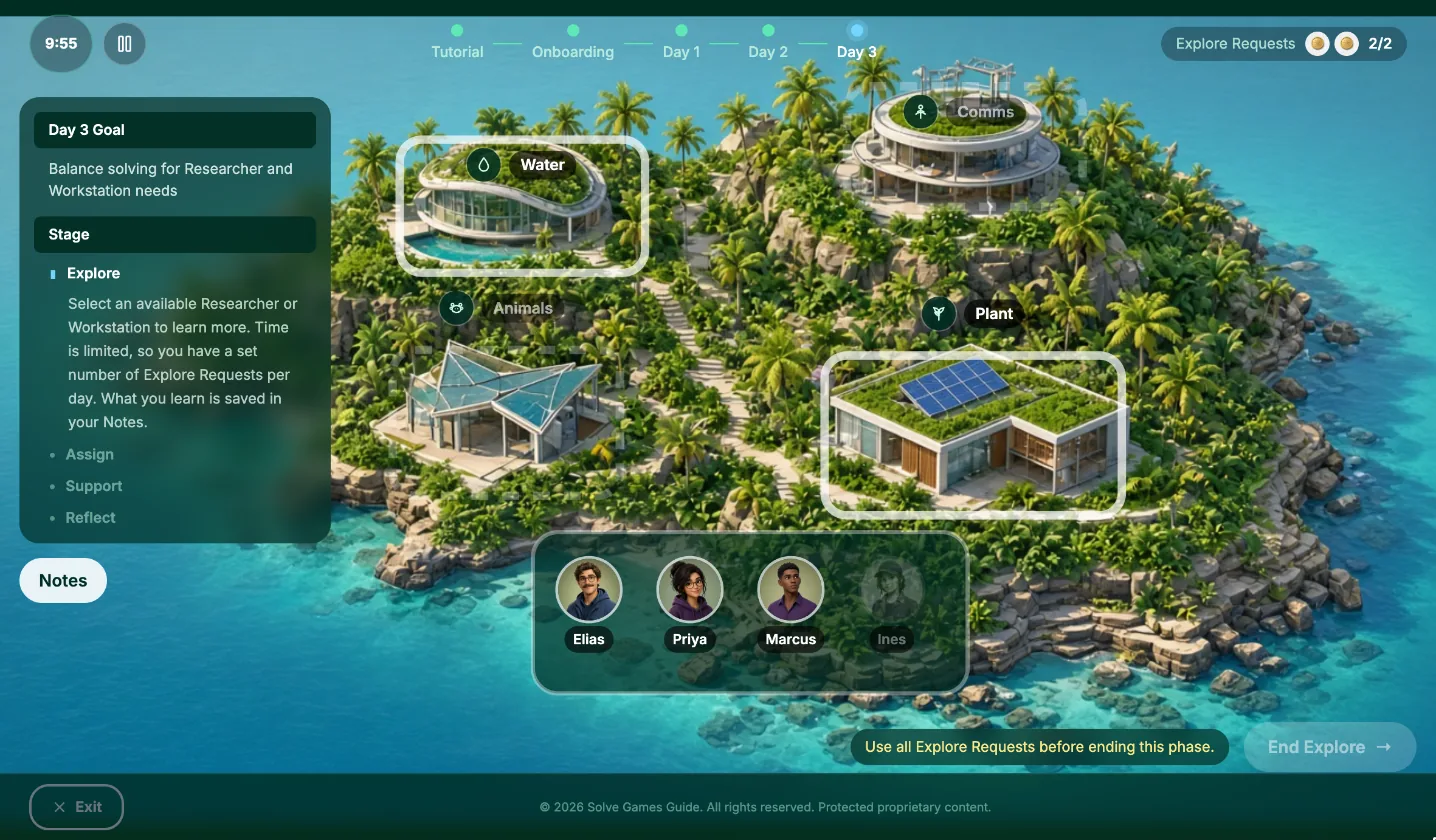
Days 2 and 3 use the same four stages. What changes is the goal, so what you look for in Explore changes too.
- Day 2 (workstation needs): Ask the workstations what needs to happen today. Look for a station with more work than one person can handle, or a decision that needs two kinds of expertise. That is where a second researcher goes.
- Day 3 (balance): You have two requests. Ask one researcher and one workstation. Look for a researcher who has run out of work and a job that nobody owns, and connect them.
Your Notes keep everything from earlier days. Use them. What a researcher said on Day 1 can still explain a decision on Day 3.
Step 8: After the game
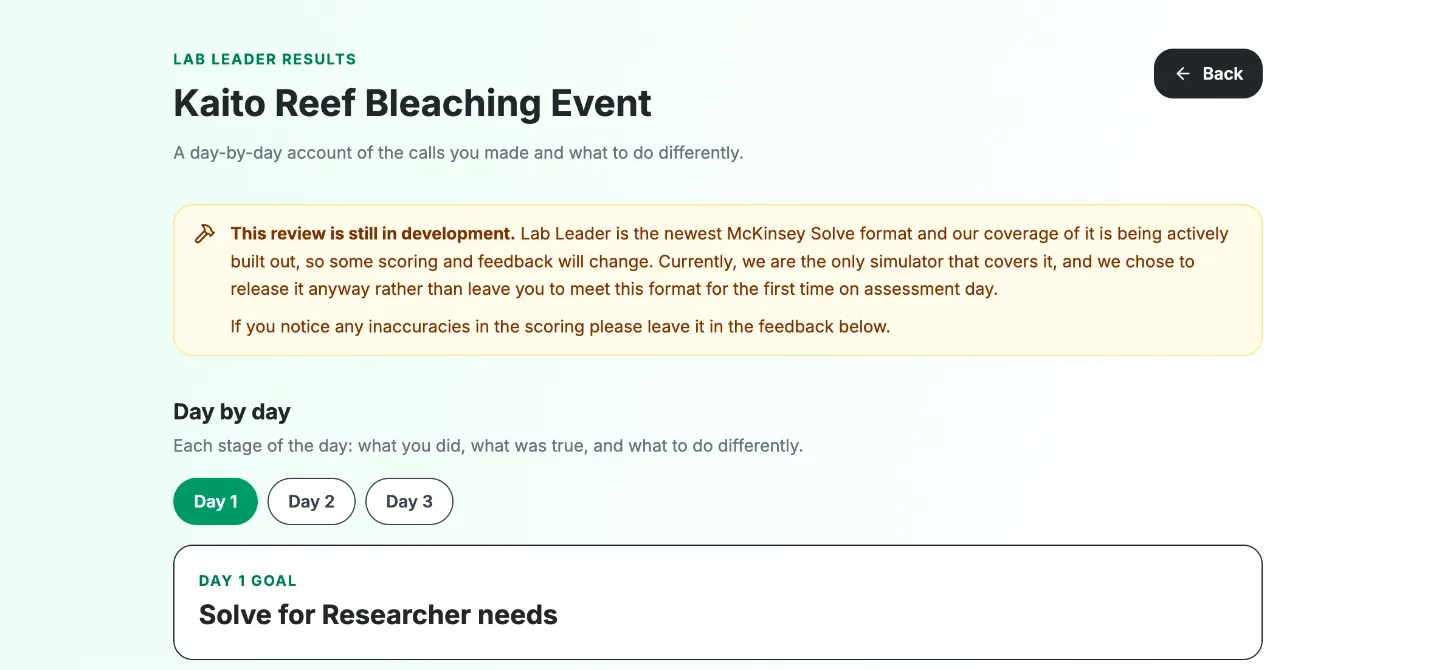
The real SFL does not show you a result at the end. In Lab Leader you get a review that goes back through each day stage by stage. It shows what you picked, what the information pointed to and where that information was.
Quick checklist
Keep this beside you during practice:
- Read the project introduction and sum up the problem in one line.
- Order the onboarding questions quickly, then read the brief for who is good at what.
- Each day, read the goal before you spend any Explore Requests.
- Spend requests on what the goal points to. Who you ask matters more than which question.
- In Assign, move people only when you have a reason. From Day 2, start from yesterday’s positions.
- In Support, act on what you know and deal with the person’s real problem.
- In Reflect, rate from each researcher’s own words, and use “I don’t know” when you have nothing.
- Aim for about ten minutes a day.
Practise it
The fastest way to get comfortable is to play through once without a timer. Lab Leader has five missions, each with its own team and problem. Practice mode removes the clock so you can learn the screens, and Assessment mode runs the full 30 minutes. You can find it in the Sustainable Futures Lab simulator.
If you have an 85-minute invitation instead, read our overview of the 20-minute SFL. For background on how the 30-minute version appeared, see the 95-minute Solve format and our Lab Leader launch post.
Was this useful?
Thanks for the feedback.
Get our latest McKinsey Solve guidance in Google's answers
Add Solve Games Guide as a preferred source so that Google's AI uses our most up-to-date information when you ask questions about McKinsey Solve.
Ready to Practice?
Get unlimited access to our McKinsey Solve Game simulators and master every scenario with realistic practice.